



New website since October 2026. See what changed

Collection:
Canon Pro-1000 Inks & Printer Accessories
Refill the original PFI-1000 tanks you already own. Our pigment ink replaces the ink, not the cartridge, and it is matched to all 12 Canon channels. Free ICC profiles, two printer-safe refill methods, and a satisfaction guarantee behind every bottle.
25+ years, 10,000+ customers
Satisfaction guarantee on every bottle
82 ml is exactly one full PFI-1000 tank
Step 1: choose your refill path
You keep your Canon tanks either way. Pick the method that fits how you print, then follow its shopping list.
Method ANo modification
Simplest: refill empty tanks and swap a $16 chip
Let a tank run completely empty, refill the unmodified tank, then install a fresh one-time chip so the printer starts that tank at full again. The 82 ml bottle is exactly one tank, predispensed, so there is no scale, syringe or measuring.
First purchase
82 ml inks, one one-time chip per tank, and High-Pressure Squeezy caps with refill needles. The No-Drill Starter Kit has all of it.
Repeat
Ink and chips.
Safeguard
The empty-tank chip cycle keeps the printer's ink tracking accurate.
Shop the No-Drill kit
Kits from $464.25
Method BSensor system
Lowest cost per print: the sensor tops you off before empty
Drill a 5/32 inch refill hole in each tank, install the Low Ink Warning System, then top tanks off through the hole before they run empty and seal with a refill plug. Original chips stay in place, and no replacement chips are ever purchased.
First purchase
The Low Ink Warning System at $248.00, a drill bit and refill plugs. The Low Ink Warning System Starter Kits add 12 x 2 oz inks, caps, needles, the drill bit and plugs.
Repeat
Ink only, usually 8 oz or 16 oz bottles.
Safeguard
The sensor watches the real ink level and warns at roughly 20 to 25 percent remaining.
Shop the sensor kit
Kits from $425.00
Drilling a tank without the sensor system is possible, but we do not recommend it for most customers. A tank that runs dry unnoticed on a drilled path can damage the printhead, which is why both supported methods carry a built-in safeguard.
Step 2: compatible or Canon OEM ink
Both refill your original PFI-1000 tanks. The difference is formulation, price and color coverage.

|

|
|
|
Precision Colors OEM-Match pigment |
Canon original pigment |
|
|
$10.00 per color |
$27.75 per color |
|
|
$18.00 per color |
$44.25 per color |
|
|
$18.00 per color |
$53.88 per color |
|
|
$34.00 / $65.00 |
Not offered |
|
|
11 colors (Red is OEM only) |
All 12 colors |
|
|
From $137.75 |
From $333.00 |
|
|
Free profiles for every color |
Use Canon's own profiles |
|
|
Needed for Method A only, $16.00 each |
Needed for Method A only, $16.00 each |
|
|
Steady printing at the lowest cost per print |
100% genuine Canon ink in your own tanks |
Getting Started Kits
Four kits, one for each combination of tank method and ink. Everything for the first refill is in the box. Red is genuine Canon in every kit, so a Red refill costs the Canon price.
|
|
|
|
|
|
No drilling. New chip each refill |
No drilling. New chip each refill |
Drill each tank once. No chips |
Drill each tank once. No chips |
|
|
11 Precision Colors inks + Canon Red |
12 genuine Canon inks |
11 Precision Colors inks + Canon Red |
12 genuine Canon inks |
|
|
12 x 82 ml, one full tank each |
12 x 82 ml, one full tank each |
12 x 2 oz, one top-off each |
12 x 2 oz, one top-off each |
|
|
12 chips |
12 chips |
Not needed |
Not needed |
|
|
Not needed |
Not needed |
Included |
Included |
|
|
12 high-pressure caps + 12 needles |
12 high-pressure caps + 12 needles |
12 caps + 12 needles + 12 needle covers |
12 caps + 12 needles + 12 needle covers |
|
|
Not needed |
Not needed |
Drill bit + 15 plugs |
Drill bit + 15 plugs |
|
|
$34.00 per tank (ink + chip) |
$60.25 per tank (ink + chip) |
$10.00 per top-off |
$27.75 per top-off |
|
|
$464.25 |
$753.00 |
$425.00 |
$625.00 |
Know your color? Jump straight to it
Eleven compatible colors from $10.00, plus OEM Red. Every color ships in 2 oz, 82 ml, 4 oz, 8 oz and 16 oz.
Canon PFI-1000GY Compatible Gray Ink for PRO-1000
Regular price
From $10.00
Sale price
Regular price
Choose your option
Canon PFI-1000PBK Compatible Photo Black Ink for PRO-1000
Regular price
From $10.00
Sale price
Regular price
Choose your option
Choose your option
Canon PFI-1000MBK Compatible Matte Black Ink for PRO-1000
Regular price
From $10.00
Sale price
Regular price
Choose your option
Choose your option
Canon PFI-1000CO Compatible Chroma Optimizer Ink for PRO-1000
Regular price
From $10.00
Sale price
Regular price
Choose your option
Canon PFI-1000Y Compatible Yellow Ink for PRO-1000
Regular price
From $10.00
Sale price
Regular price
Choose your option
Choose your option
Canon PFI-1000BL Compatible Blue Ink for PRO-1000
Regular price
From $10.00
Sale price
Regular price
Choose your option
Canon PFI-1000PM Compatible Photo Magenta Ink for PRO-1000
Regular price
From $10.00
Sale price
Regular price
Choose your option
Canon PFI-1000PC Compatible Photo Cyan Ink for PRO-1000
Regular price
From $10.00
Sale price
Regular price
Choose your option
Canon PFI-1000M Compatible Magenta Ink for PRO-1000
Regular price
From $10.00
Sale price
Regular price
Choose your option
Canon PFI-1000C Compatible Cyan Ink for PRO-1000
Regular price
From $10.00
Sale price
Regular price
Choose your option
Canon PFI-1000PGY Compatible Photo Gray Ink for PRO-1000
Regular price
From $10.00
Sale price
Regular price
Choose your option
Canon PFI-1000 Compatible Photo Black One-Time Chip for PRO-1000
Regular price
$16.00
Sale price
Regular price
Choose your option
Choose your option
One-time chips for PFI-1000 tanks
For the no-drill method. One chip per tank, per refill. Sold singly by color or as a set of 12.
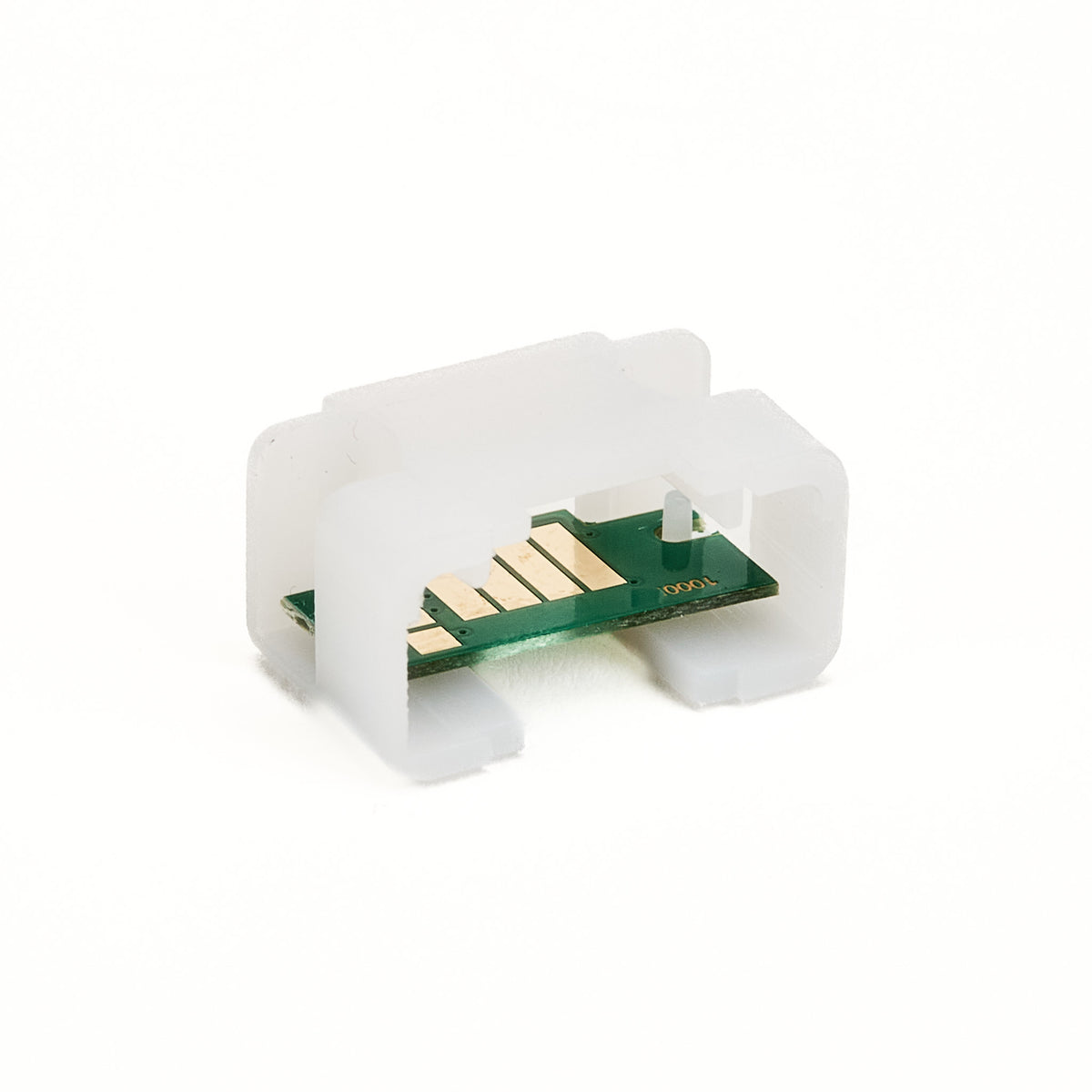
Canon PFI-1000 Compatible Photo Black One-Time Chip for PRO-1000
Regular price
$16.00
Sale price
Regular price
Choose your option
Canon PFI-1000 Compatible Chroma Optimizer One-Time Chip for PRO-1000
Regular price
$16.00
Sale price
Regular price
Choose your option
Canon PFI-1000 Compatible Red One-Time Chip for PRO-1000
Regular price
$16.00
Sale price
Regular price
Choose your option
Canon PFI-1000 Compatible Matte Black One-Time Chip for PRO-1000
Regular price
$16.00
Sale price
Regular price
Choose your option
Caps, plugs and tools
Restocking? Everything the two methods need, without scrolling through ink.
High-Pressure Squeezy Cap Combo for Pro-1000 No Modification Refilling
Regular price
$3.00
Sale price
Regular price
Choose your option
Choose your option
Choose your option
Choose your option
Choose your option
Choose your option
Questions before your first refill
Do I need to buy new cartridges?
Do I need to buy new cartridges?
Which method should I start with?
Which method should I start with?
What makes the 82 ml size special?
What makes the 82 ml size special?
Is there a chip resetter for the PRO-1000?
Is there a chip resetter for the PRO-1000?
Can I refill a tank that is not completely empty?
Can I refill a tank that is not completely empty?
Why is there no compatible Red?
Why is there no compatible Red?
Will refilling damage my printer?
Will refilling damage my printer?
Guides for the PRO-1000
Free ICC Profiles
Custom profiles made in-house with an XRite i1Pro2 spectrophotometer. Free to download.
49 papers across 6 brands
No papers match.
Red River Papers
Arctic Polar LusterPrinter media setting: Photo Paper Plus Semi Gloss ZIP Arctic Polar SatinPrinter media setting: Photo Paper Plus Semi Gloss ZIP Ultra Pro Satin 4Printer media setting: Photo Paper Plus Semi Gloss ZIP Zeppelin Semi GlossPrinter media setting: Photo Paper Plus Semi Gloss ZIP Arctic Polar GlossPrinter media setting: Photo Paper Pro Luster ZIP Polar Pearl MetallicPrinter media setting: Photo Paper Plus Glossy II ZIP Polar Gloss MetallicPrinter media setting: Photo Paper Plus Glossy II ZIP Pecos River GlossPrinter media setting: Photo Paper Plus Glossy II ZIP Ultra Pro GlossyPrinter media setting: Photo Paper Plus Glossy II ZIP Ultra Pro Glossy IIPrinter media setting: Photo Paper Plus Glossy II ZIP Palo Duro EtchingPrinter media setting: Heavy Fine Art ZIP Palo Duro SatinPrinter media setting: Photo Paper Plus Semi Gloss ZIP Palo Duro Soft Gloss RagPrinter media setting: Photo Paper Plus Semi Gloss ZIP Palo Duro Smooth RagPrinter media setting: Heavy Fine Art ZIP San Gabriel BarytaPrinter media setting: Photo Paper Plus Semi Gloss ZIP Premium MattePrinter media setting: Heavy Fine Art ZIP Premium Matte PlusPrinter media setting: Heavy Fine Art ZIP Polar MattePrinter media setting: Heavy Fine Art ZIP Blanco Canvas MattePrinter media setting: Canvas ZIP Aurora Fine Art NaturalPrinter media setting: Heavy Fine Art ZIP Aurora Fine Art WhitePrinter media setting: Heavy Fine Art ZIP Paper CanvasPrinter media setting: Heavy Fine Art ZIPCanon Papers
Photo Paper Plus Glossy IIPrinter media setting: Photo Paper Plus Glossy II ZIP Photo Paper Pro PlatinumPrinter media setting: Photo Paper Pro Platinum ZIP Photo Paper Plus Semi GlossPrinter media setting: Photo Paper Plus Semi Gloss ZIP Photo Paper Pro LusterPrinter media setting: Photo Paper Pro Luster ZIP Matte Photo PaperPrinter media setting: Matte Photo Paper ZIP Premium Matte Photo PaperPrinter media setting: Premium Matte Photo Paper ZIP Canon Museum Etching Fine Art PaperPrinter media setting: Heavy Fine Art ZIPIlford Papers
Galerie Smooth PearlPrinter media setting: Photo Paper Plus Semi Gloss ZIP Gold Fiber GlossPrinter media setting: Photo Paper Plus Semi Gloss ZIP Gold Fiber MonoPrinter media setting: Photo Paper Plus Semi Gloss ZIP Metallic GlossPrinter media setting: Photo Paper Plus Glossy II ZIP Prestige Gold Fiber SilkPrinter media setting: Photo Paper Plus Semi Gloss ZIP Prestige Smooth GlossPrinter media setting: Photo Paper Plus Glossy II ZIP Smooth Cotton RagPrinter media setting: Heavy Fine Art ZIP Textured Cotton RagPrinter media setting: Heavy Fine Art ZIP Cotton Artist TexturedPrinter media setting: Heavy Fine Art ZIPEpson Papers
Ultra Premium Photo Paper LusterPrinter media setting: Photo Paper Plus Semi Gloss ZIP Premium Semi GlossPrinter media setting: Photo Paper Plus Semi Gloss ZIP Premium GlossyPrinter media setting: Photo Paper Plus Glossy II ZIP Ultra Premium Presentation Paper MattePrinter media setting: Heavy Fine Art ZIPAbout these profiles: rendering intent, lighting variants, licensing
Profiles are created with Argyll CMS and an XRite i1Pro2 spectrophotometer. Use Relative Colorimetric rendering intent. Each download includes the standard D50 profile plus a tungsten/quartz variant for warmer viewing light. Profiles are free for Precision Colors customers; commercial redistribution requires approval.